JASO HR / PRODUCT TOUR
Take a look at
the actual product.
Three views from the JASO HR admin portal: the territory structure, a field-visit record and the reporting behind it. Explore the screens, then bring your own workflow to a walkthrough.
JASO HR is available for paid rollouts. One 10-person customer team is currently using it on a free trial.
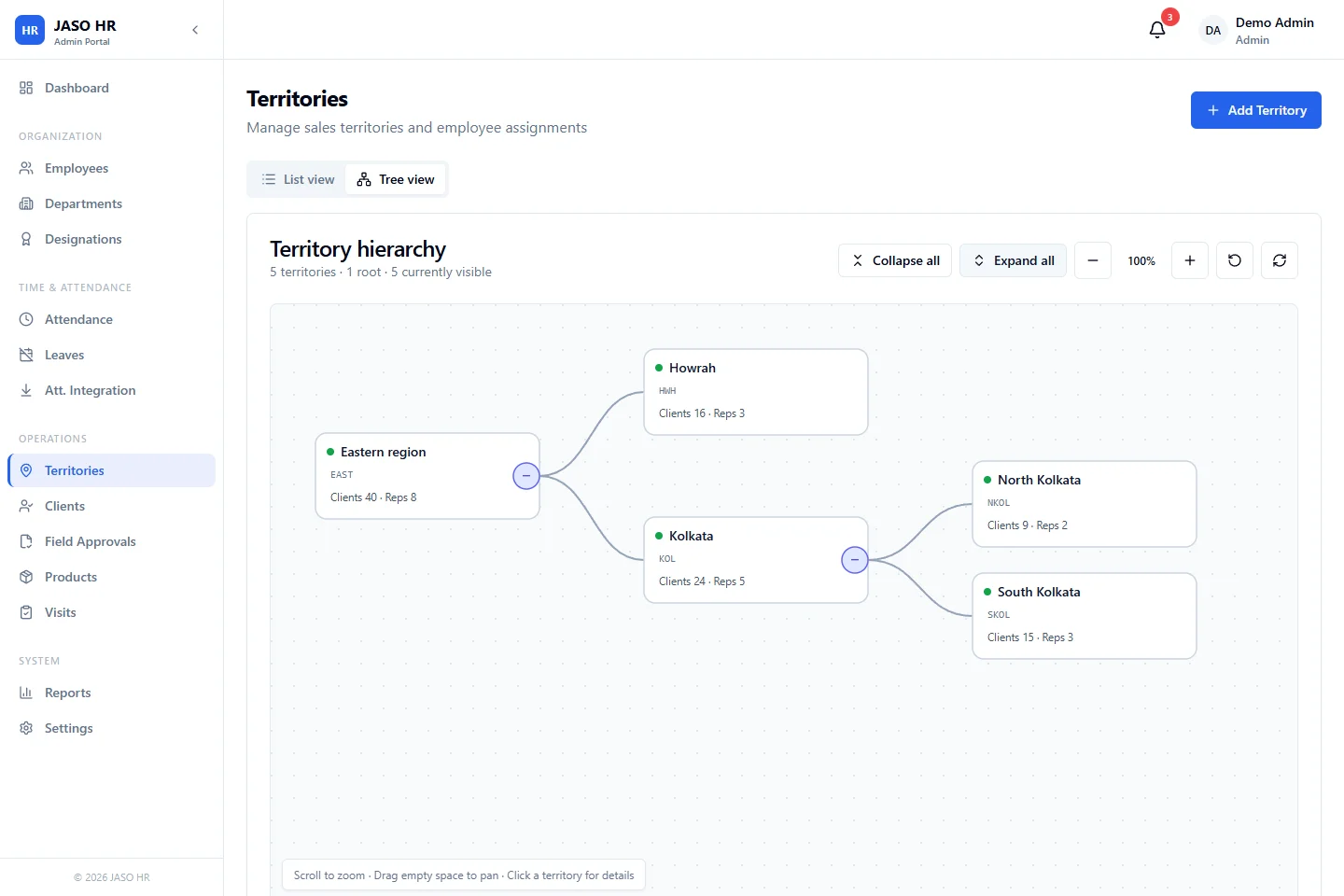
Give the field team a clear territory structure.
The portal shows territories as a hierarchy, with clients and employee counts attached to each territory. Start by agreeing responsibility and the client records that belong to each area.
MAKE THE DEMO USEFUL
Follow one task from start to finish.
Start with responsibility
Choose a rep, a territory and a sample doctor or trade client. Check who can assign, update and view those records.
Include an exception
Use a visit that falls outside the expected location or chamber-time rules. Ask who reviews it and where the decision is recorded.
Check the next decision
Compare total visits with unique clients covered. Ask which report helps a manager decide who needs a follow-up.
Start with the setup you need.
Employee records, attendance, leave, expenses and payroll share the HRMS foundation. Field-sales tools add the territory and client workflow. We’ll confirm the modules, optional reporting, data setup and support responsibilities against your requirements.
Bring your process to the screen.
A current spreadsheet, an approval problem or a field-team requirement is a useful starting point. We can check the fit and scope together.